
I had set up a fair Home Automation system for the past few years. The main parts were-
Lutron switches. These are rock solid.
Apple homekit devices for local control including an alarm system and some devices.
Smart locks based on Wifi
Smart wifi-plugs by TP-Link
Blinds based on Matter
For the most part I use Apple homekit based integrations for local control and fast response times. However I do have non-apple devices with disparate protocols like Blink cameras. To achieve a unified system I used home assistant as the primary integration point.
Home assistant integrates with many systems and can then expose all these devices over Apple Home via the Homekit Bridge integration. The rest of the family uses the familiar Apple interface while I get to set up automations in home-assistant.
However a few annoyances still plagued the system
Some blinds losing the network connectivity
Some smart wifi-plugs losing connectivity
Latency on the alarm system
Primer on Matter over thread
A few years ago, home automation devices were based on protocols like ZWave, Zigbee or proprietary systems from vendors like Apple Homekit, Google, Amazon Alexa. Matter has been the relatively new (since 6 years) standard being adopted which promises cross provider compatibility.
While I was slowly shifting from Homekit to Matter based devices, I was not using the right network protocol. Matter is supported over two network styles
Matter over WiFi forming a star topology. Every single device connects individually to your Wi-Fi router. This means that each device needs good connectivity to the router and with an increasing number of devices you have congestion.
Matter over Thread forming a resilient mesh network. There are multiple device types and some devices can talk to each other to route packets. As you add more devices, the mesh becomes more resilient.
To keep the network efficient and save battery life, Thread categorizes devices into three main roles:
Thread Border Routers(TBR)
Role - Connects Thread to Wi-Fi/Ethernet
Power - Continuous
Routers traffic - Yes
Typical device - Apple TV 4K, Home assistant with ZBT-2
Full Thread Devices (FTDs)
Role - Routes data & builds the mesh
Power - Continuous
Routers traffic - Yes
Typical device - Smart plugs, smart light switches
Minimal Thread Devices (MTDs)
Role - Sends/receives its own data only
Power - Low Power (Battery Friendly)
Routers traffic - No
Typical device - Door sensors, temperature sensors
The upgrade
In my setup
The Blinds were of type Minimal Thread Device (MTD) which were out of reach from the Thread router. Hence they lost connectivity arbitrarily.
The high number of wifi devices smart plugs (10+), personal devices (10+) and locks were all causing congestion
New hardware
Eve energy plugs which are Full thread devices to replace some TP-Link wifi plugs. This was critical.
Repurposed Raspberry Pi for home-assistant with a ZBT-2 Thread border router. This might be optional but I wanted to support the company.
The setup process took a lot of tries and the bulk of the weekend. But these are the learnings.
Install Home assistant
Setup the ZBT2 device
Setup a single Thread network. In my case I had 3 border routers which needed to be unified into a mesh
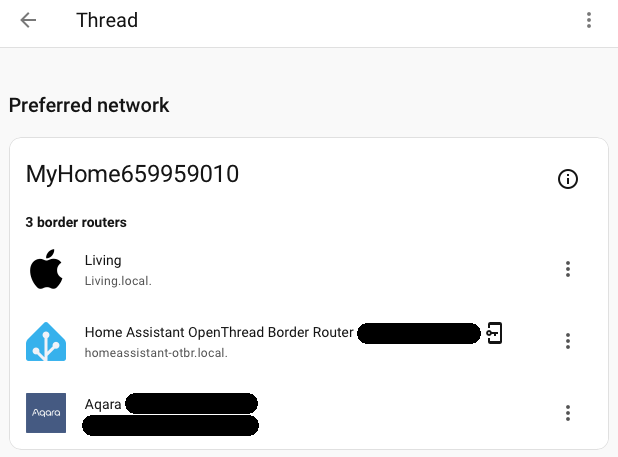
Add each matter device. This is device specific and might involve many many resets to figure out quirks.
Automations and scenes as needed
Exposing from Home Automation to preferred system like Apple homekit
And the final output was a Thread network mesh with reachability across the home.
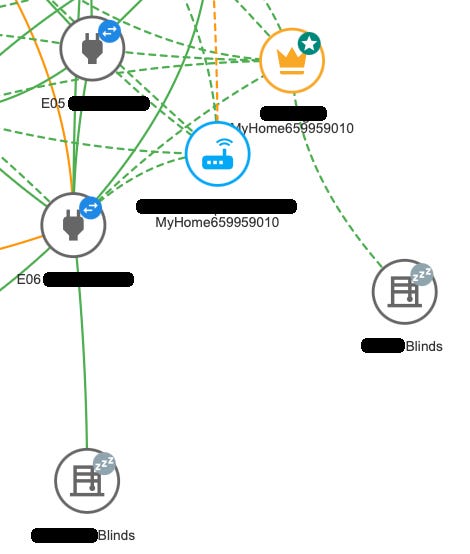
Success!